
I

Microsoft Cloud Solution Provider (CSP) Partner

]

Turn Financial Data Into Clear Insights

W

Find Hidden Value in Your Assets

Cloud vs. On-Premise POS: What’s Best for Your Business in 2025?

Cloud vs. On-Premise POS: What’s Best for Your Business in 2025?

The Point of Sale (POS) system is the heartbeat of any retail or hospitality business. As technology evolves, one of the most critical decisions business owners face is choosing between a cloud-based POS system and a traditional on-premise setup. In 2025, with digital transformation accelerating across industries, this choice matters more than ever. So, which is right for your business?

What Is a Cloud-Based POS System?

A cloud POS system stores all your sales, inventory, and customer data online, allowing you to access and manage your business from anywhere with an internet connection. Think of it as your POS living in the cloud instead of being tied to a physical server.

cloud

Key Benefits:

  • Remote Access: Manage your business on-the-go.
  • Real-Time Updates: Instant syncing of sales, inventory, and reports.
  • Scalability: Easily add new stores, registers, or users.
  • Lower Upfront Costs: No need for heavy server hardware or IT support.
  • Automatic Backups & Security Updates: Always stay protected and up-to-date.

Ideal For:

  • Multi-location businesses
  • Small to mid-sized retailers
  • Restaurants with online ordering/delivery
  • Mobile-first or tech-savvy entrepreneurs

What Is an On-Premise POS System?

An on-premise POS system is installed on local servers and hardware within your business location. Data is stored and processed on-site, typically requiring manual updates and maintenance.

Key Benefits:

  • Complete Control: Full ownership of your data and hardware.
  • No Internet Dependency: Functions without requiring constant connectivity.
  • Customization: Easier to customize for highly specific operational needs.

Ideal For:

  • Businesses with unstable or limited internet access
  • Large enterprises with internal IT teams
  • Operations requiring tight system customization or compliance

Cloud vs. On-Premise: Key Differences at a Glance

Feature Cloud POS On-Premise POS
Accessibility Anywhere, anytime Only on-location
Setup Cost Low upfront High upfront (hardware/software)
Maintenance Handled by provider Requires in-house or outsourced IT
Updates Automatic Manual
Scalability Highly scalable Limited and more complex
Offline Functionality Limited/offline mode Fully functional offline

What Should You Choose in 2025?

Ask yourself the following questions:

  • Do I need to manage multiple locations remotely?
  • Is my internet reliable?
  • Can I afford to hire IT staff for support?
  • Do I plan to scale quickly?

If you value flexibility, remote access, and scalability, a cloud POS is likely the better fit. It’s ideal for businesses embracing mobility, eCommerce, and real-time data.

If you need full control over your data and infrastructure, and operate in environments where connectivity is a challenge, on-premise may be your safer choice.

Final Thoughts

In 2025, the trend is leaning heavily toward cloud-based POS systems, thanks to their agility and lower barrier to entry. However, there’s still a place for on-premise systems in specialized or high-compliance industries.

The right POS system should align with your current needs, growth plans, and tech readiness. Choose wisely your point of sale is more than just a cash register; it’s your business command center.

Ready to elevate your retail operations? Contact Diadyn Technology or discover Diadyn POS  for more details.

What Is Project Management Software? A Beginner’s Guide

What Is Project Management Software? A Beginner’s Guide

At its heart, project management software is a digital platform that helps you plan, organize, and oversee a project from beginning to end. It’s like a command center where you can assign tasks, set deadlines, track progress, and keep everyone on the same page all in one place. Unlike a physical planner or a messy spreadsheet, it’s dynamic, collaborative, and often packed with features to make your life easier.

This isn’t just for corporate bigwigs. Freelancers use it to juggle client work, small businesses rely on it to manage inventory or marketing, and even students turn to it for group assignments. Whether your project involves one person or fifty, this software scales to fit your needs.

What is Project Management Software?

Project management software is a digital tool that helps individuals and teams plan, organize, manage, and track projects from start to finish. It provides a centralized platform for setting goals, assigning tasks, scheduling deadlines, collaborating with team members, and monitoring progress. Whether for small teams or large enterprises, these tools help streamline workflows, improve accountability, and boost overall productivity.

What Is Project Management Software

How Does Project Management Software Work?

Think of project management software as a three-legged stool: it supports planning, tracking, and collaboration. Let’s break down each piece with some detail.

1. Planning: Building the Blueprint

Every project starts with a vision say, delivering brake parts for a client like Automobile spare parts company. The software lets you turn that vision into a concrete plan:

  • Task Breakdown: Split the project into bite-sized pieces
  • Deadlines and Dependencies: Set due dates and link tasks that rely on each other
  • Visualization Tools: Use Gantt charts or Kanban boards to see the big picture.

This planning stage ensures nothing falls through the cracks before you even start.

2. Tracking: Keeping Tabs on Progress

Once the project kicks off, the software becomes your progress tracker:

  • Task Status: See at a glance who’s working on what and whether it’s on schedule, overdue, or complete.
  • Notifications: Get pinged when a deadline’s approaching .
  • Milestone Monitoring: Mark key achievements.

For instance, if a team member’s stuck sourcing a part, the software highlights the delay so you can step in early.

3. Collaboration: Bringing the Team Together

Projects often involve multiple people, and this is where collaboration shines:

  • Centralized Communication: Ditch email chains comment on tasks or chat within the tool
  • File Sharing: Upload docs, images, or PDFs (like a supplier invoice) so everyone has access.
  • Real-Time Updates: If someone finishes a task, the whole team sees it instantly, even across time zones.

Imagine coordinating a delivery: one person uploads the shipping label, another confirms receipt, and you oversee it all without leaving the platform.

Why Should You Care About Project Management Software?

Still on the fence? Here’s why it’s a game-changer, with some real-world perks:

  • Clarity: No more “Wait, who’s handling this?” everything’s laid out clearly.
  • Efficiency: Automate reminders or task assignments instead of micromanaging.
  • Accountability: Team members see their responsibilities, reducing finger-pointing.
  • Flexibility: Need to push a deadline or reassign a task? Adjust it in seconds.
  • Scalability: Works for a solo gig (e.g., “Write a blog”) or a massive rollout

Key Features to Explore

Not all tools are identical, but here’s a rundown of features beginners should look for, with examples of how they help:

  • Task Management: Create, assign, and check off to-dos.
  • Calendars and Timelines: Visualize deadlines.
  • File Storage: Attach files to tasks.
  • Time Tracking: Log hours spent.
  • Integrations: Connect with tools like Diadyn HRM, Diadyn CRM

These features vary by tool, so pick one that matches your project’s complexity.

Who Can Benefit from Project Management Software?

It’s not just for suits in boardrooms. Here’s who’s using it and how:

  • Freelancers: A graphic designer tracks revisions, deadlines, and client feedback for multiple gigs.
  • Small Businesses: A shop like Automobile spare parts store coordinates stock orders, deliveries, and promotions.
  • Students: A group plans a research paper, assigning sections and due dates.
  • Large Teams: A construction crew schedules equipment, labor, and inspections for a build.

No matter your role, if you have got goals and steps to hit them, this software fits.

Final Thoughts

Project management software isn’t about overcomplicating things it’s about turning chaos into calm. It’s your roadmap, your cheerleader, and your safety net, all rolled into one. For beginners, it’s less about mastering every feature and more about finding a system that clicks for you. So pick a tool, start small, and watch your projects run smoother than ever.

Check out Diadyn Project  a solution from Diadyn Technology that blends project management with broader business tools to keep you on track.
How CRM Works: A Step-by-Step Guide to Customer Relationship Management

How CRM Works: A Step-by-Step Guide to Customer Relationship Management

In today’s fast-paced, customer-centric world, businesses need to stay connected with their clients like never before. Enter Customer Relationship Management (CRM) a powerful tool that helps companies manage interactions, streamline processes, and build stronger relationships with their customers. But how exactly does CRM work? In this step-by-step guide, we will break down the mechanics of CRM and show you why it’s a game-changer for businesses of all sizes.

How CRM Works

What Is CRM, Anyway?

Before diving into the how, let’s clarify the what. A CRM system is a software solution designed to organize and manage customer data, track interactions, and automate key business processes. Think of it as a digital command center that keeps your customer relationships on track whether you’re a small startup or a global enterprise.

Now, let’s walk through the step-by-step process of how CRM works.

Step 1: Collecting Customer Data

The foundation of any CRM system is data. The process begins with gathering information about your customers. This can include:

  • Basic Details: Names, email addresses, phone numbers, and job titles.
  • Interaction History: Records of calls, emails, meetings, or chats.
  • Purchase Behavior: What they have bought, when, and how often.
  • Preferences: Likes, dislikes, and special requests.

Modern CRMs pull this data from multiple sources your website, social media, email campaigns, or even manual entries by your team. The goal? To create a 360-degree view of each customer.

Step 2: Organizing and Storing Information

Once the data is collected, the CRM organizes it into a centralized database. No more scattered spreadsheets or sticky notes! Every piece of information is stored securely and tagged to the right customer profile.

This organization allows your team to:

  • Quickly access customer details during a call or meeting.
  • Segment customers based on criteria like location, purchase history, or engagement level.
  • Ensure everyone in the company is working from the same, up-to-date info.

Cloud-based CRMs take this a step further by making data accessible anytime, anywhere, as long as you’ve got an internet connection.

Step 3: Tracking Interactions

A CRM doesn’t just store static data it tracks every interaction a customer has with your business. Whether it’s a support ticket, a sales inquiry, or a follow-up email, the system logs it in real time.

This tracking provides a timeline of the customer journey, helping you:

  • Understand where they are in the sales funnel.
  • Identify patterns in their behavior.
  • Spot opportunities to engage or upsell.

For example, if a customer emails about a product issue, the CRM records it, assigns it to the right team member, and ensures no one drops the ball.

Step 4: Automating Tasks

One of the biggest perks of CRM is automation. Repetitive tasks like sending welcome emails, scheduling follow-ups, or generating reports can be handled by the system, freeing up your team to focus on what matters building relationships.

Examples of automation in action:

  • A new lead fills out a form on your website, and the CRM automatically assigns them to a salesperson.
  • A customer’s subscription is about to expire, triggering a renewal reminder email.
  • Sales reports are compiled and sent to your inbox every Monday morning.

Automation saves time and reduces human error, making your operations smoother and more efficient.

Step 5: Analyzing and Improving

CRM systems come with built-in analytics tools that turn raw data into actionable insights. By studying customer trends, sales performance, and campaign results, you can:

  • Identify your top-performing products or services.
  • Pinpoint bottlenecks in your sales process.
  • Predict future customer needs based on past behavior.

For instance, if your CRM shows that 70% of customers drop off after a free trial, you might tweak your onboarding process to boost retention. It’s all about using data to make smarter decisions.

Step 6: Enhancing Customer Relationships

At its core, CRM is about people, not just processes. With all this data and automation at your fingertips, you can personalize your approach like never before.

Imagine:

  • Wishing a customer a happy birthday with a tailored discount.
  • Recommending products based on their purchase history.
  • Resolving issues faster because you already know their background.

These small touches build trust and loyalty, turning one-time buyers into lifelong advocates.

Why CRM Matters

So, why invest in a CRM? The benefits are clear:

  • Efficiency: Centralize data and automate tasks to save time.
  • Growth: Spot sales opportunities and nurture leads effectively.
  • Customer Satisfaction: Deliver personalized experiences that keep people coming back.

Whether you are managing 10 customers or 10,000, a CRM scales with your business, keeping you organized and in control.

Getting Started with CRM

Ready to see CRM in action? Here’s how to begin:

  1. Define Your Goals: Are you focused on sales, support, or marketing?
  2. Choose a System: Popular options include Diadyn CRM, HubSpot, and Zoho pick one that fits your budget and needs.
  3. Train Your Team: Ensure everyone knows how to use it effectively.
  4. Start Small: Import existing data and test the waters before going all-in.

Final Thoughts

Customer Relationship Management isn’t just software it’s a strategy for putting customers at the heart of your business. By collecting data, tracking interactions, automating tasks, and analyzing results, a CRM empowers you to work smarter, not harder. The result? Happier customers, a more efficient team, and a thriving business.

Want to explore a CRM that’s packed with features to streamline your workflow? Check out Diadyn CRM for a solution that’s designed to grow with you.
What is CRM Software? A Beginner’s Guide

What is CRM Software? A Beginner’s Guide

what is crm

Customer Relationship Management (CRM) software is a powerful tool that helps businesses manage interactions with customers, streamline processes, and improve relationships. Whether you are a small startup or a large enterprise, CRM software can enhance customer satisfaction, boost sales, and improve productivity.

In this guide, we’ll explore what CRM software is, how it works, and why your business needs it.

What is CRM Software?

CRM software, or Customer Relationship Management software, is a technology solution designed to help businesses manage, track, and enhance their interactions with customers and potential clients. It acts as a centralized platform to store customer data such as contact information, purchase history, preferences, and communication records  making it easily accessible for teams. Beyond data storage, CRM software automates and streamlines key processes like sales tracking, lead management, marketing campaigns, and customer support. It also provides analytics and reporting tools to uncover insights, enabling businesses to personalize customer experiences, improve retention, and drive sales growth.

Key Functions of CRM Software:

  • Contact Management – Stores customer details, purchase history, and communication logs.
  • Sales Automation – Tracks leads, automates follow-ups, and manages sales pipelines.
  • Marketing Integration – Helps run email campaigns, track responses, and analyze customer behavior.
  • Customer Support – Organizes support tickets, chat interactions, and issue resolutions.
  • Reporting & Analytics – Provides insights into customer trends, sales performance, and team productivity.

Types of CRM Software

Depending on business needs, CRM software can be categorized into three main types:

  • Operational CRM –Operational CRM focuses on automating and streamlining day-to-day customer-facing processes, such as sales, marketing, and customer service. It aims to improve efficiency by automating repetitive tasks and ensuring smooth interactions with customers at every touchpoint.
  • Analytical CRM –  Analytical CRM focuses on collecting, analyzing, and interpreting customer data to provide actionable insights. It helps businesses understand customer behavior, predict trends, and make data-driven decisions to improve strategies.
  • Collaborative CRM – Collaborative CRM emphasizes communication and coordination between teams, departments, and even external stakeholders (e.g., vendors or partners). It ensures that everyone involved in customer interactions has access to the same up-to-date information.

Benefits of Using CRM Software

  • Centralized Customer Data Management : CRM software acts as a single repository for all customer-related information, consolidating data from various sources into one accessible platform. This includes contact details, purchase history, communication logs (emails, calls, chats), and even social media interactions.
  • Improved Customer Relationships : CRM software helps businesses build stronger, more personalized relationships with customers by providing insights into their needs, preferences, and behaviors.
  • Enhanced Sales Efficiency and Revenue Growth :CRM software streamlines the sales process, helping teams work smarter, close deals faster, and identify opportunities for upselling or cross-selling.
  • Streamlined Marketing Campaigns : CRM software empowers marketing teams to create, manage, and analyze campaigns with precision, ensuring they reach the right audience with the right message.

    • Better Customer Support and Satisfaction: CRM software enhances customer service by providing tools to manage inquiries, resolve issues quickly, and maintain high satisfaction levels.
    • Data-Driven Decision Making : CRM software provides analytics and reporting tools to help businesses make informed decisions based on customer data.

    What does a CRM system do?

    A CRM system, or Customer Relationship Management system, is a powerful tool that helps businesses manage, organize, and optimize their interactions with customers and prospects. At its core, a CRM system centralizes customer data such as contact details, purchase history, and communication logs into a single platform, making it easy to access and analyze. It streamlines key business processes by automating tasks like lead tracking, sales forecasting, and email marketing, while also enhancing customer support through ticketing systems and live chat features. By providing actionable insights through analytics and reporting, a CRM system empowers teams to personalize customer experiences, improve retention, and boost sales efficiency. Whether you’re a small business nurturing leads or an enterprise scaling operations, a CRM system drives better relationships and business growth.

    Final Thoughts

    Choosing the right CRM software can transform the way your business manages customer relationships, streamlines workflows, and drives growth. Whether you are a small business or a large enterprise, investing in a robust CRM solution will help improve efficiency and customer satisfaction.

    Ready to take your customer relationship management to the next level? Book a Meeting with Diadyn CRM experts today and find the perfect CRM solution for your business

    Best Task Management Software Tools for Boosting Productivity

    Best Task Management Software Tools for Boosting Productivity

    In today’s fast-paced work environment, effective task management is essential for staying organized, meeting deadlines, and maximizing productivity. Whether you’re a freelancer, a small business owner, or part of a large corporation, using the right task management tool can streamline your workflow and improve team collaboration. Here are some of the best task management software tools foor boosting productivity.

    1. Diadyn Task

    Diadyn Task Management Solution. Designed for teams of all sizes, our platform helps you organize tasks, set priorities, track progress, and collaborate efficiently. Whether you’re managing daily tasks or large projects, our intuitive tool ensures seamless execution and increased efficiency.

    Key Features:

    • Task Organization & Prioritization – Create, assign, and prioritize tasks for better workflow management.
    • Real-time Collaboration – Share updates, comments, and attachments to keep teams aligned.
    • Deadline & Reminder Alerts – Stay on track with automated notifications and due date reminders.
    • Progress Tracking : – Monitor team performance with insightful analytics
    Best Task Management Software Tools for Boosting Productivity

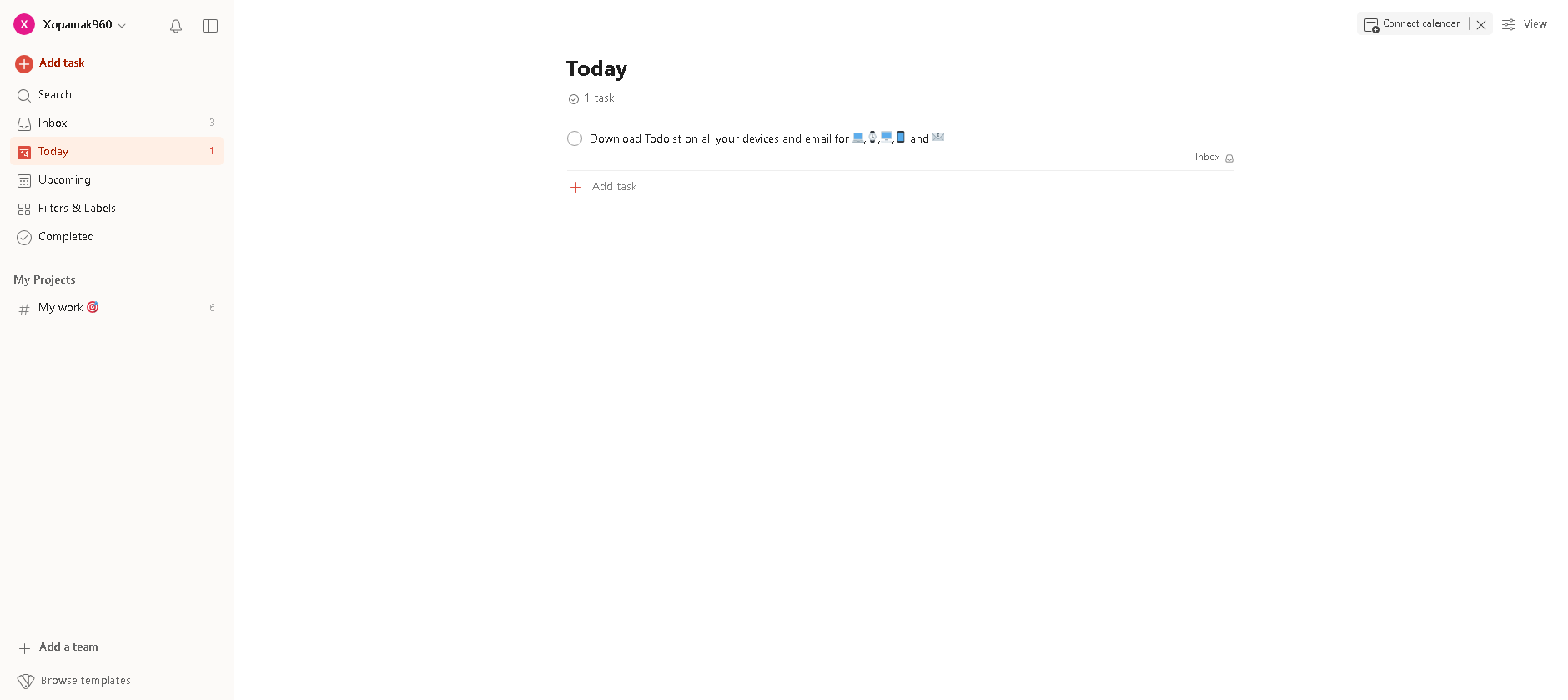
    2.Todoist

    Todoist is a powerful and intuitive task management tool designed to help individuals and teams stay organized, focused, and productive. Whether you’re managing daily to-dos, planning complex projects, or collaborating with a team, Todoist ensures everything stays on track with smart features and seamless integrations.

    Key Features:

    • Task Organization & Prioritization – Easily create tasks, set due dates, and prioritize what matters most.
    • Recurring Reminders – Set recurring due dates for tasks to automate routine responsibilities.
    • Collaboration Tools – Assign tasks, add comments, and share files with team members.
    • Cross-Platform Access – Available on web, mobile, and desktop for on-the-go task management.
    • Smart Productivity Insights – Track your progress with detailed reports and analytics.
    • Seamless Integrations – Connect with apps like Google Calendar, Slack, Trello, and more.

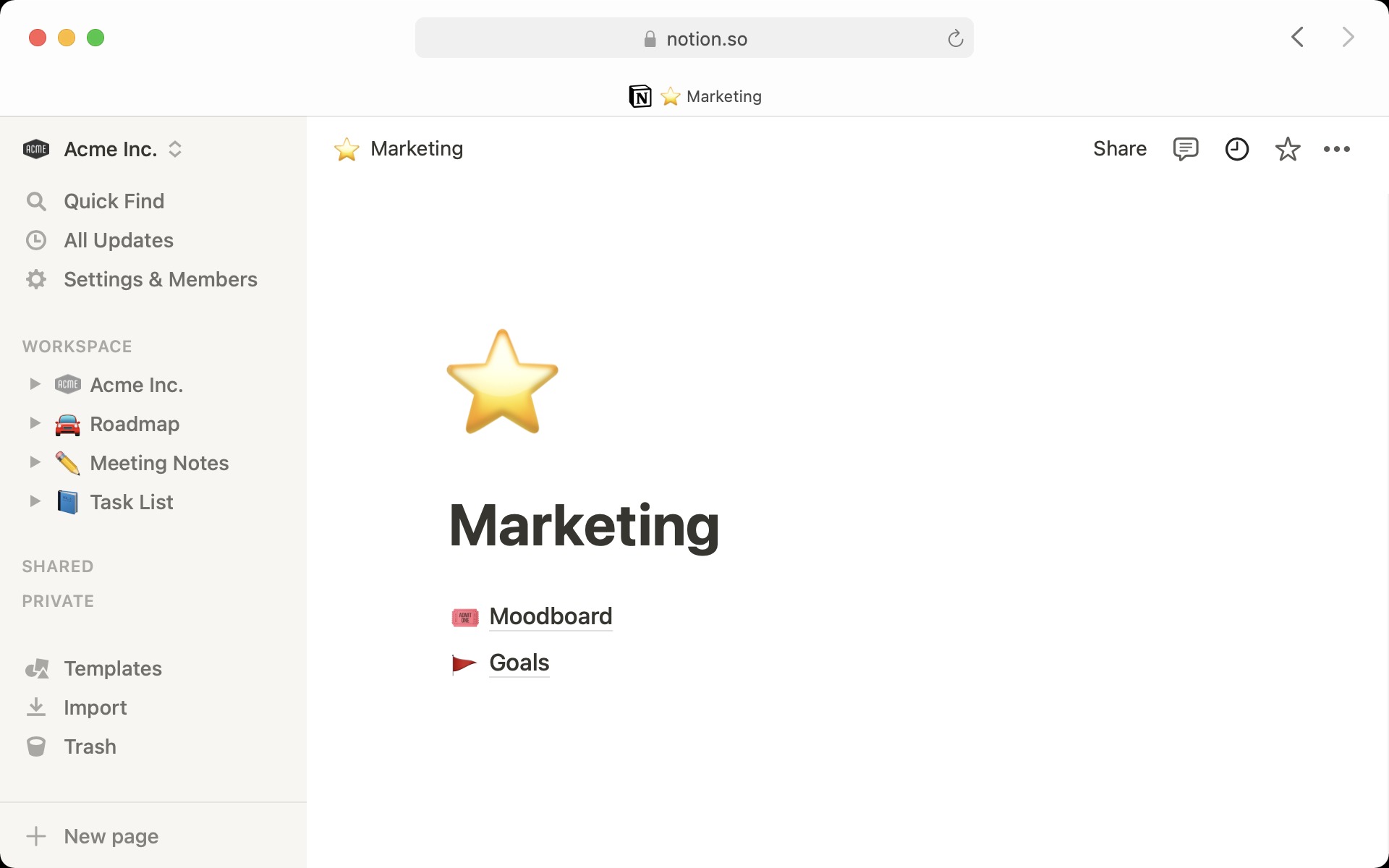
    3.Notion

    Notion is a powerful, all-in-one workspace that combines task management, note-taking, database organization, and team collaboration into a single platform. Whether you’re an individual looking to streamline your daily tasks or a team managing complex projects, Notion offers a flexible and customizable environment to stay organized and boost productivity.

    Key Features:

    • Task & Project Management – Create to-do lists, set deadlines, assign tasks, and track progress effortlessly.
    • Flexible Notes & Documents – Take rich-text notes, embed multimedia, and structure information your way.
    • Customizable Databases – Organize data using tables, kanban boards, calendars, and more.
    • Team Collaboration – Share workspaces, comment on pages, and collaborate in real-time.
    • Templates & Automation – Use pre-built templates or create your own for repetitive workflows.
    • Cross-Platform Sync – Access your work on desktop, mobile, and web seamlessly.

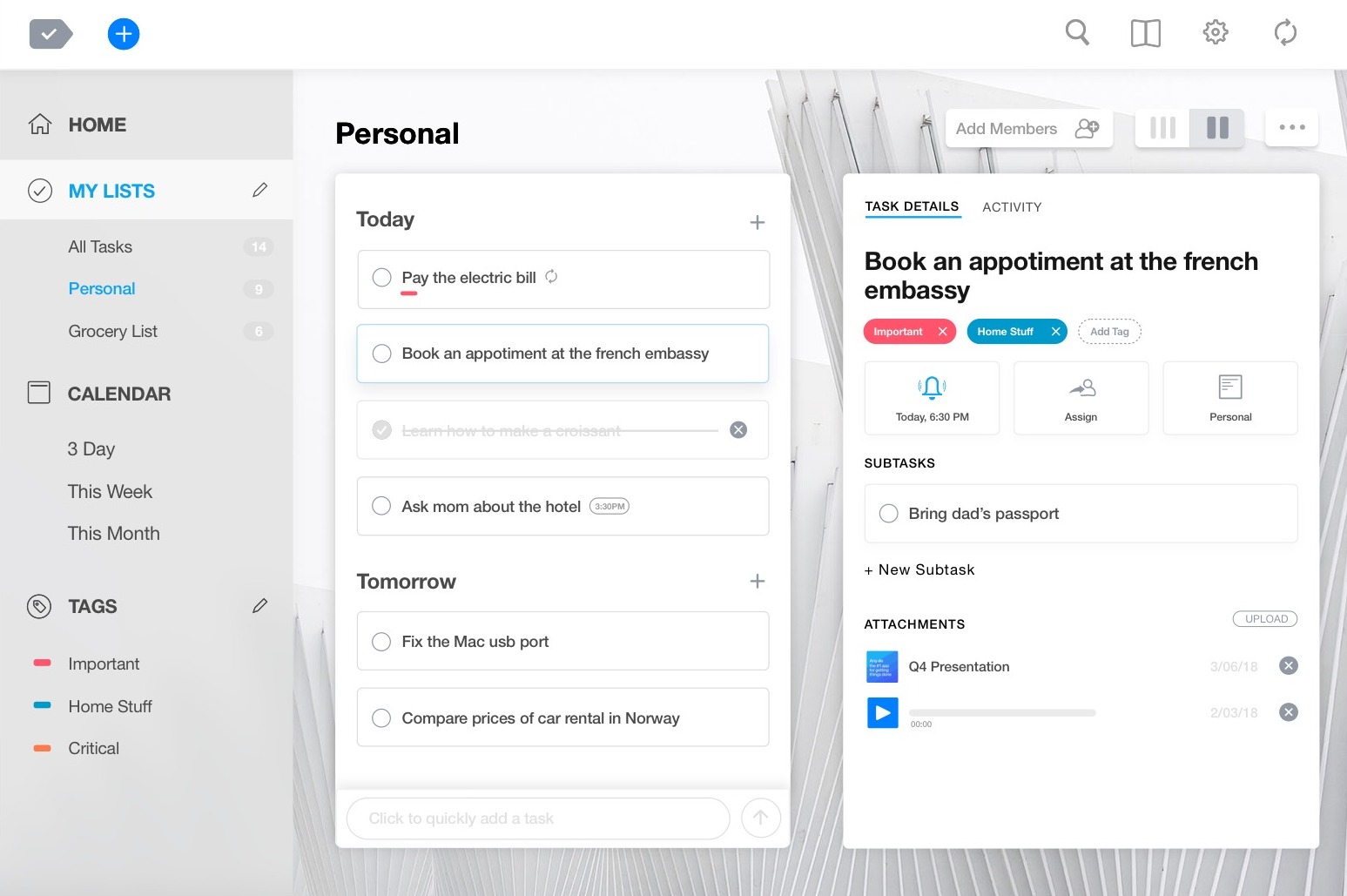
    4.Any.do

    Any.do is a powerful task management and productivity app designed to help individuals and teams stay organized, manage tasks, and meet deadlines effortlessly. With its intuitive interface, smart reminders, and seamless integrations, Any.do ensures you never miss an important task—whether for personal use or business projects.

    Key Features:

    • Task & To-Do List Management – Easily create, organize, and prioritize tasks in a user-friendly interface.
    • Smart Reminders & Recurring Tasks – Set one-time or recurring reminders so you never forget important deadlines.
    • Calendar Integration – Sync with Google Calendar, Outlook, and Apple Calendar for a unified scheduling experience.
    • Collaboration & Sharing – Assign tasks, share lists, and coordinate work with teammates or family members.
    • Voice Task Creation – Quickly add tasks using voice commands for hands-free productivity.
    • Cross-Platform Syncing – Available on mobile, desktop, web, and even smart assistants like Alexa and Google Assistant.

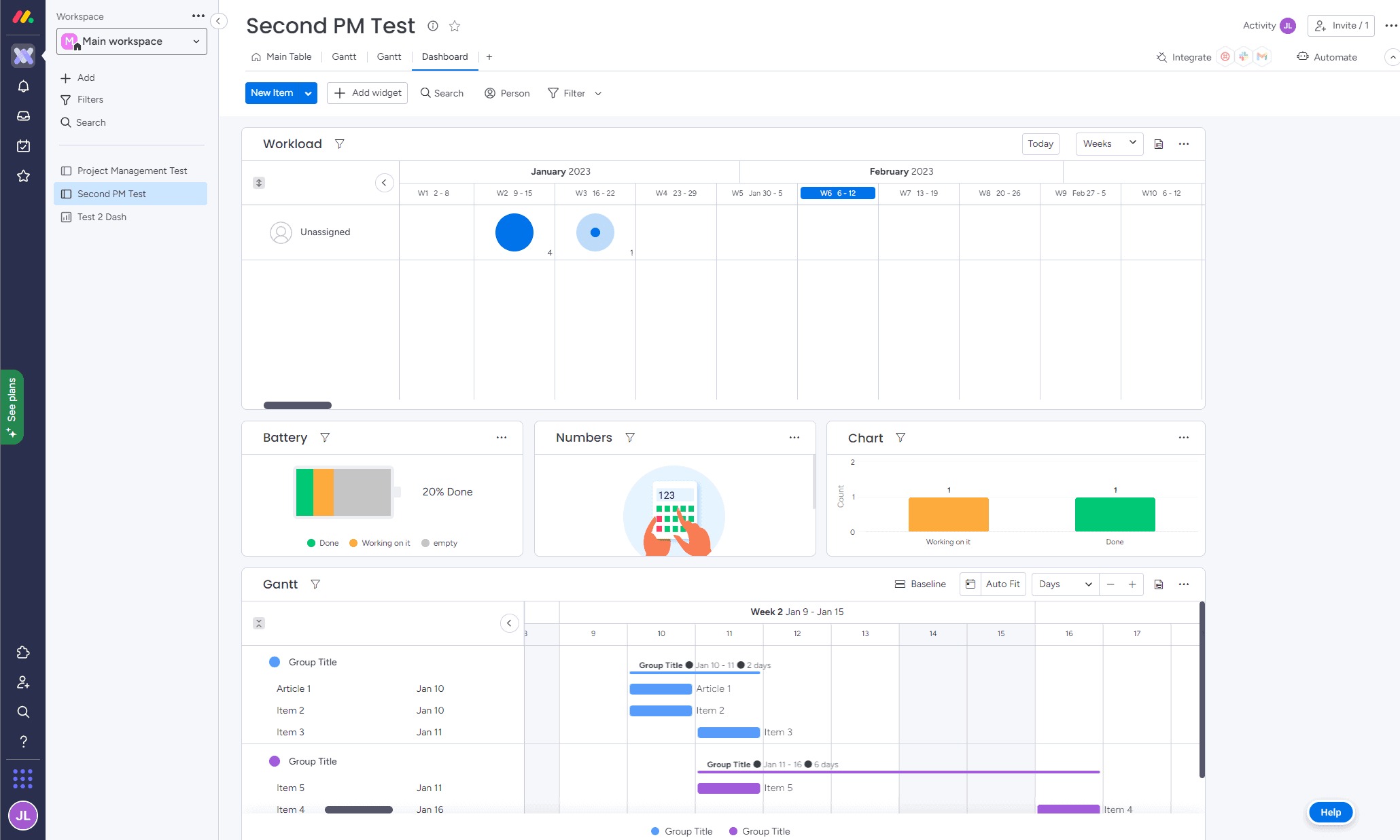
    5.Monday.com

    Monday.com is a visually appealing platform that excels at managing team tasks and workflows with automation. Its customizable dashboards provide a bird’s-eye view of projects, making it a favorite for scaling operations.

    Key Features

    • Customizable Workflows – Create workflows tailored to your team’s unique processes.
    • Drag-and-Drop Interface – Easily organize tasks, deadlines, and priorities.
    • Collaboration Tools – Communicate with your team via comments, mentions, and file sharing.
    • Automation & Integrations – Automate repetitive tasks and integrate with tools like Slack, Google Drive, and Zoom.
    • Time Tracking – Monitor time spent on tasks to improve efficiency.
    • Multiple Project Views – Use Kanban, Gantt charts, calendar, or list views.
    • Advanced Reporting & Analytics – Get insights into project progress and team performance.

    Wrapping Up

    Choosing the right task management tool can transform the way you and your team work. Whether you need a simple to-do list or a full-scale project management solution, the right platform will help streamline workflows, enhance collaboration, and boost overall productivity. Investing in an efficient task management system not only reduces stress but also ensures that projects stay on track, deadlines are met, and resources are optimized.

    Invest in a powerful task management system to streamline your processes and meet deadlines with ease. Ready to take your productivity to the next level? Explore Diadyn Task and Sign Up Today for seamless task management

    How to Choose the Best Helpdesk Software for Your Business

    How to Choose the Best Helpdesk Software for Your Business

    In today’s fast-paced world, delivering exceptional customer support is non-negotiable. Whether you are a small startup or a growing enterprise, your helpdesk software is the backbone of your customer service operations. It’s the tool that keeps tickets organized, teams aligned, and customers happy. But with so many options out there, how do you pick the best one for your business?

    Choosing the right helpdesk software doesn’t have to feel like a gamble. By focusing on your business needs, budget, and long-term goals, you can find a solution that fits like a glove. Here’s a step-by-step guide to choose the best helpdesk software

    best helpdesk software

    1. Identify Your Business Needs

    Before you even glance at software options, you need a clear picture of what your business demands. This step is about laying the groundwork think of it as your blueprint for success. Start by asking specific questions:

    • What’s our ticket volume? A small e-commerce store handling 10 customer questions a day doesn’t need the same firepower as a tech firm resolving 200+ IT tickets. Knowing your scale helps narrow the field.
    • Who’s using it? Is this just for your customer support reps, or do IT, sales, or even operations need access? A tool that serves multiple teams might need broader functionality.
    • What channels matter most? Do your customers reach out via email, phone, live chat, social media, or all of the above? If you’re active on platforms like X, you’ll want software that pulls in those interactions seamlessly.

    2. Focus on Must-Have Features

    Once you’ve got your requirements, it’s time to match them to features. The best helpdesk software doesn’t overwhelm you with bells and whistles it delivers what you need, cleanly and efficiently. Here’s a breakdown of key features to consider:

    • Ticket Management: This is the core of any helpdesk. Look for software that lets you track tickets from start to finish, assign them to the right people, and prioritize urgent issues. For instance, a late shipment complaint might need to jump the queue over a general question.
    • Multi-Channel Support: Customers don’t stick to one way of reaching you. Your software should pull in emails, phone calls, live chats, and even social media messages into one dashboard. Imagine a customer tweeting a complaint can your team respond without switching apps?
    • Automation: Repetitive tasks eat up time. Automation can tag tickets based on keywords (e.g., “billing” or “tech issue”), route them to the right team, or send follow-up emails. It’s like having an extra set of hands that never sleeps.
    • Self-Service Options: A knowledge base or FAQ section lets customers find answers on their own like how to reset a password or check order status.
    • Analytics: You can’t improve what you don’t measure. Look for reports on response times, ticket resolution rates, and customer satisfaction scores. These insights show if your support is hitting the mark or needs a tune-up.

    3. Ensure It’s User-Friendly

    The most powerful software in the world is useless if your team dreads logging in. Usability is king here’s how to judge it:

    • Intuitive Design: The interface should feel natural, with clear buttons and workflows. If you are clicking around aimlessly during a demo, it’s a red flag. Think of it like a smartphone good design makes it second nature.
    • Customization: Every business runs differently. Can you tweak ticket forms, set up custom statuses (e.g., “Awaiting Parts”), or design dashboards that show what you care about? Flexibility ensures the tool molds to your process, not the other way around.
    • Training and Support: Even simple tools need a kickstart. Does the provider offer onboarding webinars, tutorials, or a help center? And if something breaks, is their support team quick to respond? A vendor that leaves you hanging isn’t worth your time.

    Test it yourself or with your team. If it takes an hour to figure out how to assign a ticket, it’s too complicated. A tool should lift your team up, not drag them down.

    4. Think About Scalability

    Your business isn’t static, and your helpdesk software shouldn’t be either. Scalability means planning for growth without boxing yourself into a corner. Here’s what to check:

    • Growth Capacity: If you add 10 more employees or double your ticket volume, can the software keep up? Some tools cap users or charge steep fees as you scale know the limits upfront.
    • Flexibility: Look for tiered plans or add-ons that let you expand features like adding live chat or more integrations when you are ready. It’s like building a house with room for an extra floor later.
    • Integration: As your tech stack grows (think CRM, Slack, or billing tools), your helpdesk should connect seamlessly. A tool that’s an island now might be a headache later.

    5.Set a Budget That Works

    Cost matters, but it’s not just about the sticker price it’s about value. Helpdesk software spans free plans to enterprise suites, so here’s how to approach it:

    • Pricing Models: Some charge per user (e.g., $10/month per agent), others per ticket, or a flat rate. A five person team might love per-user pricing, while a high-volume operation might prefer a flat fee. Pick what aligns with your setup.
    • Total Cost: Look beyond the base price. Are there setup fees? Does training cost extra? Will you need premium features later that jack up the bill? Add it all up.
    • Return on Investment: A $50/month tool that saves 10 hours of manual work could pay for itself fast. Diadyn Technology emphasizes efficiency think about how faster resolutions or fewer tickets could boost your bottom line.

    6.Research Reviews and Reliability

    Vendors will promise the moon, but real users tell the truth. Do your homework:
    • User Feedback: Platforms like G2, Capterra, or even X posts from businesses like yours reveal the good, bad, and ugly. Is it buggy? Slow? A dream to use? Look for patterns.
    • Uptime and Performance: Downtime kills support. Check if the software has a solid track record most vendors publish uptime stats (aim for 99.9% or higher).
    • Vendor Support: If the tool crashes, will you get help fast? Look for 24/7 support or a responsive team. A vendor that ghosts you mid-crisis is a dealbreaker.

    Final Thoughts

    Choosing the best helpdesk software is about finding the right tool for your business not just the most popular one. Define your needs, prioritize usability and scalability, and test your options. Diadyn Help Desk stands out with its streamlined ticket management and technical integration capabilities. Whatever your choice, the right helpdesk software will streamline your operations, boost team morale, and keep your customers coming back.

    Ready to start? Explore Diadyn Help Desk or another top pick, Book a Meeting , and see how it transforms your support game. Your perfect solution is waiting!